 Pedro Guimarães
Tokens cost money and eat up your usage limits. But there’s a second tax that’s harder to notice: as the context window fills up, Claude gets worse. It forgets instructions, repeats itself, loses track of what it was doing mid-task. I’ve watched it happen enough times that I started obsessing over keeping context clean.
Here’s everything I wish I’d found earlier.
Settings you should change today
The defaults are conservative. Drop this into ~/.claude/settings.json:
{
  "model": "opusplan",
  "env": {
    "MAX_THINKING_TOKENS": "16000",
    "CLAUDE_AUTOCOMPACT_PCT_OVERRIDE": "65",
    "CLAUDE_CODE_SUBAGENT_MODEL": "haiku"
  },
  "defaultMode": "plan"
}
Quick rundown:
opusplan gives you Opus for planning and Sonnet for execution. Reasoning quality stays high where it matters, and the actual file edits happen on a cheaper model.
MAX_THINKING_TOKENS defaults to 31,999. That’s a lot of internal monologue. I dropped it to 16,000 and haven’t noticed a quality difference for normal work. If you need deeper reasoning, bump it back up. Tweak to taste.
CLAUDE_AUTOCOMPACT_PCT_OVERRIDE — most people don’t touch this. By default, Claude waits until the context is 95% full before compacting. By that point, quality has already degraded. I set mine to 65%. Sessions stay noticeably sharper. Compaction kicks in earlier than the default, so find the number that works for you.
CLAUDE_CODE_SUBAGENT_MODEL defaults to whatever your main model is. Subagents don’t need Opus — they’re reading files, running grep, executing tests. Haiku handles that fine.
defaultMode starts Claude Code in plan mode every time. I’ve used this for a while and don’t miss the default.
Compression proxies
Two tools that compress shell output before Claude sees it.
RTK intercepts common commands (ls, cat, git log, git diff, npm, and others) and compresses their output before it reaches Claude. Setup is two commands:
brew install rtk
rtk init -g --hook-only
I’ve been running it for a few weeks. Here’s what the savings look like:
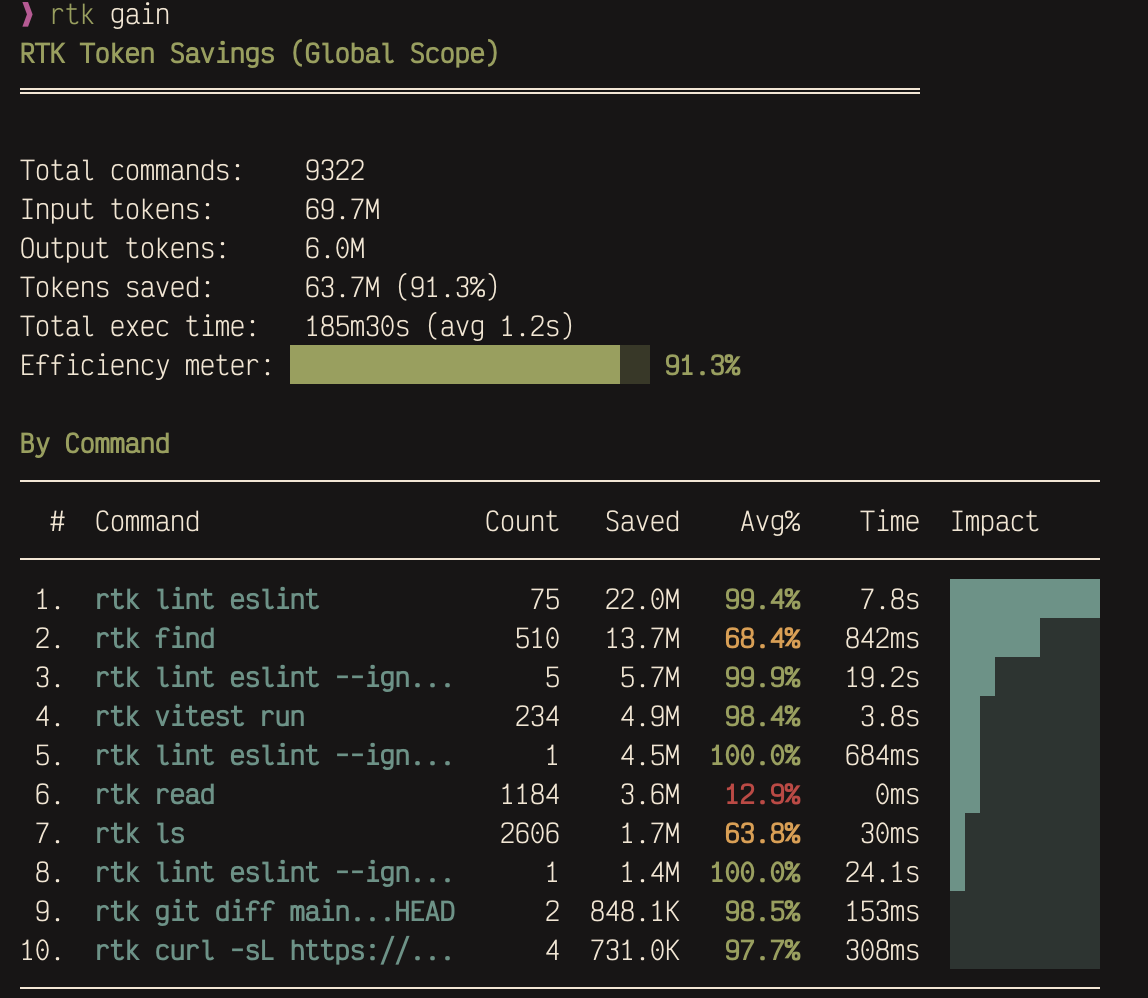
Over 9,000 commands intercepted, 63.7M tokens saved. The biggest wins come from lint output and file listings — stuff that’s repetitive and compresses well.
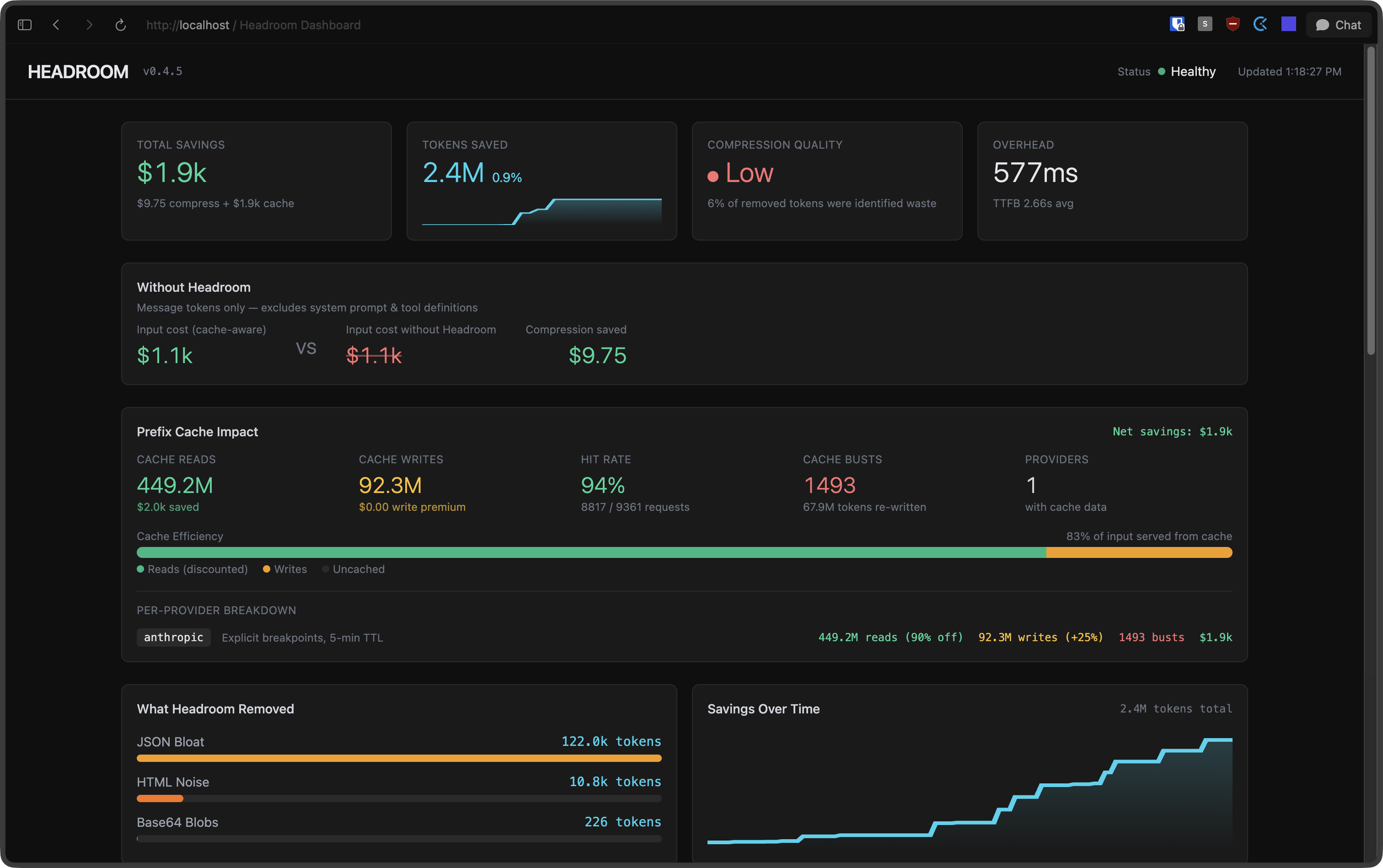
Headroom goes after a different layer. It sits between you and Claude as a context compression proxy, squeezing down boilerplate in tool outputs, database results, logs, and conversation history. You can use both together.
pip install "headroom-ai[all]"
headroom wrap claude
The dashboard at http://localhost:8787/dashboard shows compression stats in real time:
Subagents
When Claude searches files or runs tests in your main session, all that output lands in your context window. Hundreds of lines of grep results, full file dumps, stack traces from failing tests. It adds up fast.
Subagents run in their own context. They do their work and return a compact summary. The noise stays in their window, not yours. I started using these late and the difference was immediate.
You define them as markdown files under ~/.claude/agents/ (global) or .claude/agents/ (per-project). Here are four I keep around:
researcher.md — looks things up without polluting my context
---
name: researcher
description: Research agent for gathering information from the web, documentation, and codebases.
model: haiku
tools: Read, Grep, Glob, WebFetch, WebSearch
---

workflow:
  1: most authoritative source first (official docs > SO > blogs)
  2: cross-reference when findings conflict
  3: include version numbers and dates

output:
  Answer: direct answer (1-3 sentences)
  Details: evidence, code examples, config snippets
  Sources: URLs or file paths
verifier.md — runs the check suite and reports back pass/fail
---
name: verifier
description: Runs typecheck, lint, and tests. Use after implementation or as a pre-commit check.
model: haiku
tools: Read, Bash, Grep, Glob
---

workflow:
  1: detect project type via config files
  2: run checks: typecheck → lint → tests
  3: return consolidated pass/fail report

rules:
  always-run-all: even if earlier checks fail
  read-only: do not fix anything
reviewer.md — read-only code review, catches things I miss
---
name: reviewer
description: Read-only code reviewer for quality, correctness, and security analysis. Use when you need a second pair of eyes on code changes, want to catch bugs before committing, or need a structured review of a module.
model: sonnet
tools: Read, Grep, Glob, LSP
---

priority-order:
  1-correctness: logic errors, off-by-one, race conditions, missing edge cases
  2-security: injection, XSS, auth bypass, hardcoded secrets, unsafe deserialization
  3-performance: O(n^2)→O(n), missing indexes, N+1, memory leaks
  4-api-contracts: breaking changes, missing boundary validation, incorrect types

skip: linter-handled-style | minor-naming | missing-comments | impossible-state-handling

output-per-finding:
  [SEVERITY] file_path:line_number
  Issue: one sentence
  Why: why it matters
  Fix: concrete suggestion (code snippet if helpful)

severity: CRITICAL | HIGH | MEDIUM | LOW
summary: total by severity + verdict (ship / fix-then-ship / needs-rework)
implementer.md — writes code in isolation and returns just the diff
---
name: implementer
description: Focused code implementation agent. Works best with a precise spec.
model: sonnet
tools: Read, Edit, Write, Grep, Glob, Bash, LSP
---

workflow:
  1: read target area, understand patterns and conventions
  2: minimum changes to satisfy spec
  3: match existing code style

scope: only what spec requires, no extras
output:
  Changes:
    - file_path: what changed (1 sentence)
Keep CLAUDE.md short
Claude reads your CLAUDE.md files on every single turn. The global one, the project one, any nested ones. Every turn.
The shorter it is, the better your results. If you want tips on writing a good one, there’s a presentation here.
.claudeignore
Same idea as .gitignore. Tell Claude to skip files it doesn’t need:
node_modules/
dist/
*.min.js
coverage/
.next/
If you have large generated files, vendor directories, or build output sitting around, this keeps them out of the index.
Context hygiene
/compact manually triggers context compaction. I hit it when Claude starts losing the thread or when I’m about to pivot to a different subtask. You can also pass it a note about what’s coming next: /compact lets focus on the login tests now
/clear wipes context entirely. Between unrelated tasks, it’s almost always worth it. Dragging stale context from a finished feature into a new bug fix wastes tokens and usually makes Claude’s first attempt worse. Start clean.
Plan before you build
I run in plan mode by default. Claude explores the codebase, proposes an approach, and waits for my go-ahead before touching anything. It catches misunderstandings before they turn into wasted edits.
Use the built-in tools
Claude Code has dedicated tools (Read, Grep, Glob) that return structured, compact results. The bash equivalents (cat, grep, find) dump raw terminal output, which is noisier and eats more context.
Claude mostly picks the right tools on its own, but if you notice it shelling out to cat or grep regularly, add a note to your CLAUDE.md telling it to prefer the built-in tools.
The payoff compounds. Longer sessions, sharper Claude, fewer moments where it forgets what you told it five minutes ago.